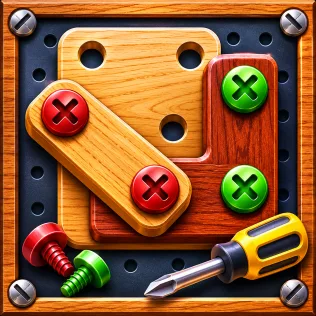
Torkwood is a screw puzzle game where you remove exposed screws, sort them into matching color boxes, and clear layered wooden planks.
How to play Torkwood
- Remove screws that are not covered by planks and send them to matching color boxes.
- Fill each box with three screws; it then closes and the next color box opens.
- Remove every plank’s screws until all the planks fall off the board.
- Keep the holding slots from filling: the level ends if they are full and no free screw matches an open box.
Computer
- Mouse clickremove a screw
- Huse a hint
- Z or Uundo last move
- Rrestart the level
- P or Escpause
Touch screen
- Tap a screw to remove it.
- Use the Hint, Undo and +1 Slot buttons at the bottom of the screen.
- Use the buttons at the top to pause or restart the level.
About Torkwood
Torkwood is a single-player screw puzzle set around wooden planks fastened to a board in layers. You work from exposed screws, sort them by color into boxes, and manage limited holding slots when a matching box is not available. Some levels add numbered locks that require matching key screws, while Hint, Undo and +1 Slot boosters can help with tricky layouts. The game was developed by Yuppiy and first released in 2026. It has 100 levels, with a Hard level every tenth stage.
Tips for Torkwood
- Check the colored markers between boxes before sending screws to the holding slots; they show which colors are coming next.
- Tap a locked screw to reveal its numbered key, then clear any planks covering that key.
Game info
- Developer
- Yuppiy
- Released
- 2026
- Players
- Single player
- Devices
- Computer, phone and tablet
Frequently asked questions
What happens when there is no open box for a screw’s color?
The screw waits in a holding slot. When a box of that color opens, waiting screws move into it automatically.
How do you remove a locked screw?
Unscrew the key screw with the same number first. Tap the locked screw to highlight its key.
Who made Torkwood?
Torkwood was made by Yuppiy. It first came out in 2026.
Can I play Torkwood on my phone?
Yes. Torkwood works on phones and tablets as well as on computers.
Can I play Torkwood with friends?
No. Torkwood is a single-player game.
Does Torkwood save my progress?
Yes. Your progress is saved in your browser, so clearing browser data or using a private window resets it.
Is Torkwood free?
Yes. You can play Torkwood for free in your browser on Yuppiy, without downloading anything.